What’s the easiest one-click application for jobs
If you are applying for several jobs a week, filling in the same details again and again gets tiring fast. That is why many people search for the easiest one-click application for jobs.
The honest answer is that no single platform is the easiest for everyone. “One-click” can mean very different things, from LinkedIn’s Easy Apply to Indeed’s quick-apply option to a simple “Apply with CV” button on an employer’s own site. This guide compares the main options, explains how they work, and helps you choose the right one for your situation in the USA or UK.
Key Takeaways
- There is no universal “easiest” platform. The best option depends on your profile, your industry, and your country.
- LinkedIn Easy Apply and Indeed Apply are the two most widely known quick-apply options.
- Quick apply is fast, but fast applications are also easy for everyone else to send, so competition can be heavy.
- For jobs you really want, applying on the employer’s own careers page is often worth the extra time.
- Features, limits, and labels change, so always check the current process on each platform.
What Does “One-Click Application” Mean?
A one-click application usually means you can apply without retyping your details. The platform reuses information you have already saved, such as your profile, CV, and previous answers.
In practice, “one-click” often takes a few clicks. You may still need to confirm your contact details, upload a CV, or answer screening questions. The main types are:
- Platform-based quick apply, such as LinkedIn Easy Apply or Indeed Apply, where you apply without leaving the site.
- Profile-based apply, where an employer lets you sign in with an existing profile.
- Employer “quick apply” forms, which are short versions of a company’s full application.
What Is the Easiest One-Click Job Application?
For most people, the quickest options are LinkedIn Easy Apply and Indeed Apply, because both let you apply without leaving the platform. Which one feels easiest depends on where you already have a complete profile or CV saved.
- If you keep a strong LinkedIn profile, LinkedIn Easy Apply will feel easiest.
- If you have a CV saved on Indeed, Indeed Apply will feel easiest.
- If you want the highest chance of being read, a short direct application on the employer’s site may be “easy enough” and more effective.
1. LinkedIn Easy Apply

LinkedIn describes Easy Apply as a streamlined application experience that lets you submit your application without leaving LinkedIn.com. Relevant skills from your profile may be included with your application to help highlight your qualifications.
What to know:
- LinkedIn may offer to save your resume and answers so they can be reused for later applications. You can manage this in your job application settings.
- LinkedIn has introduced daily and speed limits on Easy Apply submissions, which are meant to encourage more thoughtful applications and to curb automation. Mass-applying in one sitting may therefore not work.
- Because popular roles can attract large numbers of applicants, your profile and answers need to stand out.
Best for: people with a complete, keyword-rich LinkedIn profile, especially in professional, tech, and corporate roles.
2. Indeed Apply

Indeed Apply, also called Indeed Easy Apply or Quick Apply, lets candidates apply directly on Indeed. Instead of being redirected to a career site, job seekers can apply on Indeed using their Indeed Profile, which includes their resume and other credentials.
What to know:
- You can use an Indeed Resume or upload your regular resume, and if a job has special questions, Indeed shows them during the application.
- Jobs with this option are labelled in search results, with wording such as “Easily Apply”, “Apply with your Indeed Resume”, or “Apply instantly”.
- Some employers use it to skip extra documents. One employer-side guide notes that Quick Apply can skip required documents like cover letters or portfolios, so your application may carry less information than a full one.
Best for: people applying across many industries, including retail, hospitality, healthcare support, and entry-level roles, and anyone who applies mostly from a phone.
3. Other Quick-Apply Job Platforms
Many other job sites offer a similar fast-apply experience. Check each one’s current process before relying on it:
- ZipRecruiter (popular in the USA)
- Glassdoor (many listings link to employer sites or Indeed)
- Reed, Totaljobs, and CV-Library (popular in the UK)
- Gov.uk Find a job (UK government job listings)
- Employer career pages that offer “Apply with LinkedIn” or “Apply with Indeed”
Quick-apply labels and features differ between sites and change often, so treat this list as a starting point and verify how each one works.
4. One-Click Application vs. Full Application
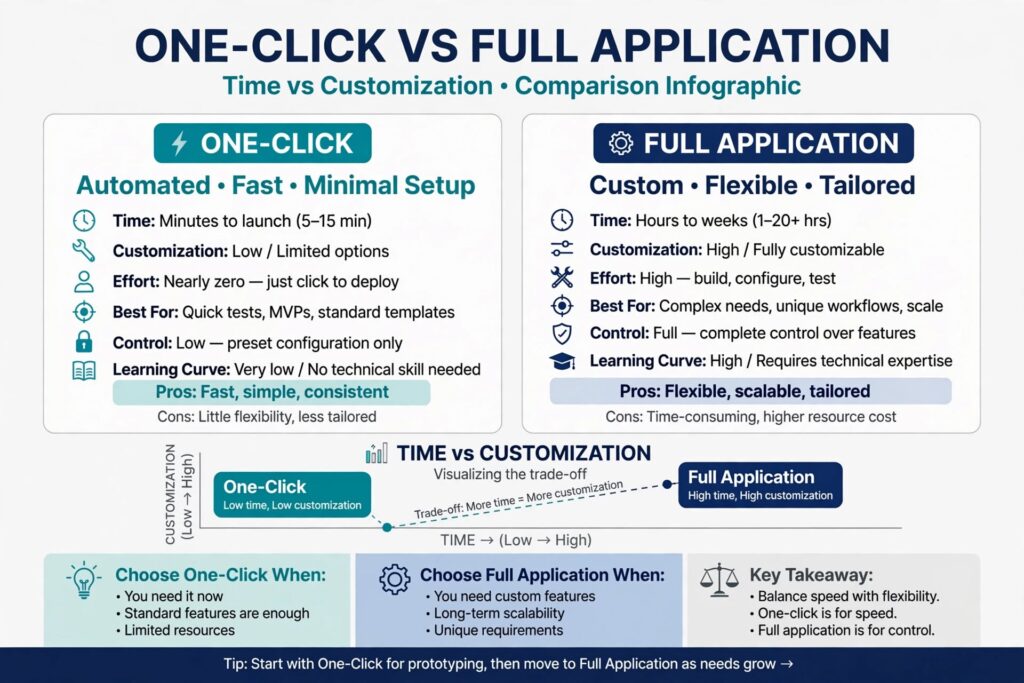
| Factor | One-Click / Quick Apply | Full Application on Employer Site |
|---|---|---|
| Time needed | A few minutes or less | Often 15 to 25 minutes |
| Customization | Limited | High (tailored answers, cover letter) |
| Competition | Often heavy | Often lighter |
| Best for | Many roles, speed, mobile | Roles you really want |
| Risk | Generic application gets lost | Takes more effort |
A recent comparison argues that on LinkedIn, Easy Apply takes about 30 seconds, while applying on the company’s careers page can take 15 to 25 minutes. The same source notes that popular roles can receive hundreds of applications quickly, so being fast is not the same as being seen. Treat figures like these as indicative, since they vary by role and employer.
5. Which Option Is Best for USA Job Seekers?
- Indeed Apply is a strong choice for hourly, entry-level, and service roles, where speed matters and employers often hire quickly.
- LinkedIn Easy Apply suits white-collar, professional, and remote roles, especially if your profile is polished.
- Direct employer applications are often the better choice for competitive companies.
- Check whether the employer expects a US-style resume rather than a CV, and keep it to a clean, readable format.
6. Which Option Is Best for UK Job Seekers?
- Indeed UK and LinkedIn both offer quick-apply options for UK listings.
- Reed, Totaljobs, and CV-Library are widely used UK job boards, and each offers its own way to apply with a saved CV. Confirm the current features on each site.
- Gov.uk Find a job lists UK government-run vacancies.
- In the UK, a CV (not a resume) is standard, and many employers still expect a short cover letter for professional roles.
7. Pros and Cons of One-Click Applications
Pros
- Saves a lot of time on repetitive forms
- Convenient on mobile
- Helpful when you are applying alongside work or study
- Useful for quickly testing the market
Cons
- Applications may feel generic
- Heavy competition on popular roles
- Your CV or profile is still checked by systems. One analysis notes that Easy Apply does not skip the ATS, and knockout screening questions can still reject you automatically.
- Platform limits may stop you from sending many applications at once
- Some options skip extra documents that could have helped you stand out
How to Make One-Click Applications More Effective
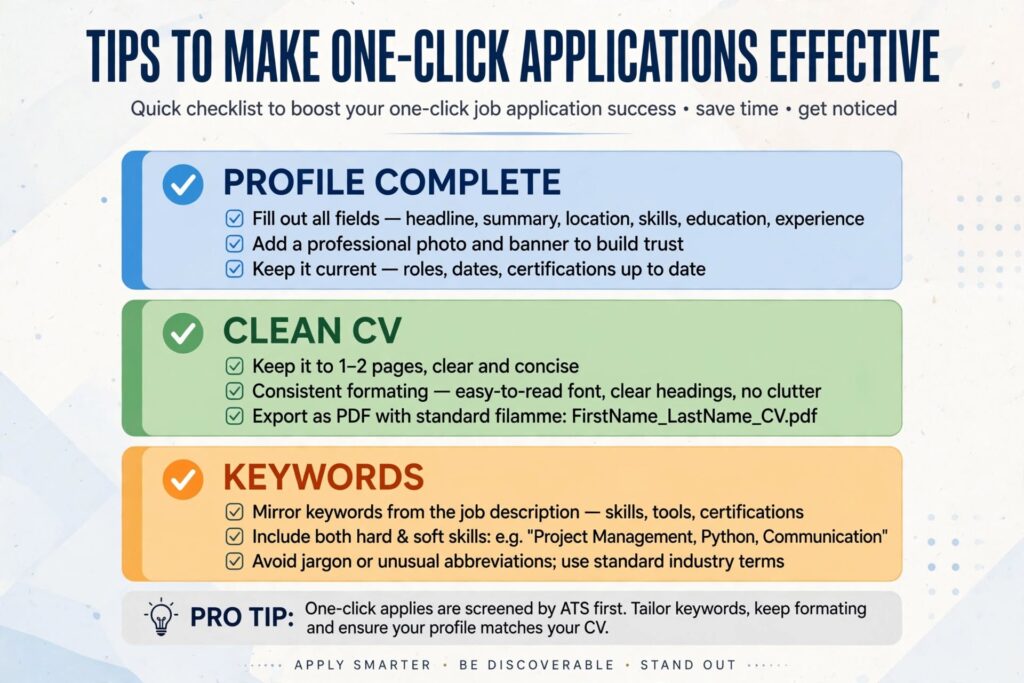
- Complete your profile. A full LinkedIn or Indeed profile gives employers more to work with.
- Use a clean, text-friendly CV. Avoid heavy graphics, tables, and unusual fonts that may not parse well.
- Mirror the job description. Use relevant keywords from the listing honestly in your CV and profile.
- Answer screening questions carefully. Some answers can disqualify you automatically.
- Apply fewer, better-matched roles. Quality beats volume.
- Follow up. For roles you care about, also apply on the company site or contact the recruiter or hiring manager.
- Keep a tracker. Record where and when you applied so you can follow up.
Common Mistakes to Avoid
- Applying to dozens of roles without reading the descriptions
- Using one generic CV for every job
- Ignoring screening questions
- Relying only on quick apply for dream jobs
- Not checking your resume or CV for parsing errors
- Forgetting to update your profile after changing your skills or experience
FAQs
What is the easiest one-click application for jobs?
It depends on where your profile is strongest. LinkedIn Easy Apply and Indeed Apply are the most widely known options, and both let you apply without leaving the platform.
Is LinkedIn Easy Apply really one click?
Often it takes a few steps, such as confirming your details and answering questions. It is still much quicker than a full application form.
Do employers take quick-apply applications seriously?
Many do, but competition can be heavy. Strong profiles and well-matched applications stand out more. For jobs you really want, consider applying directly too.
Is there a limit on LinkedIn Easy Apply?
LinkedIn states it has introduced daily and speed limits on Easy Apply submissions. Check LinkedIn’s help centre for current details.
Can I use my own CV with Indeed Apply?
Yes. Indeed says applicants can use an Indeed Resume or upload their regular resume.
Which is better for the UK, Indeed or LinkedIn?
Both are widely used. Choose based on the roles you want and where your profile is strongest, and also check UK-specific boards such as Reed and Totaljobs.
Is applying on the company website better than quick apply?
Not always, but it often gives you more room to personalize your application, which can help for competitive roles.
Are one-click applications free?
Applying through these platforms is generally free for job seekers, but features and subscription options can change, so check the current terms.
Final Verdict
There is no single “easiest” one-click application for everyone. LinkedIn Easy Apply is usually easiest if your LinkedIn profile is strong, and Indeed Apply is often easiest if you are applying across many industries or from your phone. For roles you really want, a short, tailored application on the employer’s own site is often worth the extra minutes.
The smartest approach is a balance: use quick apply to save time on good matches, and invest more effort in the few jobs that matter most.
Also Read : Futurescape Personality Quiz: Results, RIASEC Types & Career Guide